I’ve recently been given the opportunity to branch out into the wonderful world of E-Commerce, in particular high-tech B2B E-Commerce. It’s kind of interesting when you think about it; someone who is responsible for social media – with its “loose” metrics and ever-elusive connection to ROI – to also be wearing the E-Commerce hat.
I have a feeling that further down the line, the partnership between Social Media and E-Commerce may not be as odd as it initially seems. On the other hand, Search Engine Marketing and E-Commerce immediately opens up endless opportunities for web conversion. This journey is going to be a real eye opener and a great chance to apply some pretty cool integrated online marketing.
Some key questions to consider when setting up an E-Commerce operation:
- Will you build your own custom E-Commerce site, or use an existing software solution?
- What products will you offer? Your full portfolio or just a sub-section of it?
- Will the order go directly to yourself or through to a distributor?
- Will you handle fulfilment yourself, or use a third-party vendor?
- How will you promote the availability of your online store?
Right now, I’m in the “learning as I go” phase. I’ve been reading up on the basics, but hoping to get my hands dirty in the coming months. Here’s a few useful articles I’ve come across:
- 7 questions to consider when evaluating your checkout
- Google check-out retailers say icons boost click-through and conversion
- Google merchant center FAQ
If anyone has any tips and wise words of advice for me, I’d love to hear.
Regular readers may have noticed something slightly different about today’s post. More on that in a sec.
I’ve been regularly blogging for about nine months now, and whilst I have loved it for the most part, there are a number of things I regret. Every so often I’ll throw up my hands and grumble as to why no-one ever told me about “this” or “that” sooner…
So here are 5 tips I wish people had given me before I started on my blogging journey.
1. Use WordPress instead of Blogspot
Now to put this into context, if you told me to go off and build a website I would stare at you blankly; I’m not a technical person or a web developer by any means. So when I first considered starting up a blog my criteria was pretty simple: free and easy!
To be completely honest, I didn’t spend a whole lot of time researching different blogging platforms, a mistake I regret in retrospect. A lot of my favourite blogs at the time used Google Blogspot, and hey, it was Google… You can’t go wrong with Google. So Blogspot it was.
This is not to say that I’m a Blogspot basher – Blogspot does what it says on the wrapper (and I’m sure with the right skills, you can tweak and add to it). Over time though, I found there was a lot more I wanted to get out of my blogging experience than simply writing content and pressing a publish button. This is when I started experimenting with WordPress. In fact, a few months ago I started up a blog in WordPress (totally unrelated to marketing) to see how the free versions compared.
How I regret not starting off my blog in WordPress. I found it offered up easy customization to help the most non-technical of people make their blog look and feel more like their own (including the ability to add different widgets, easily display Twitter and RSS feeds, change banner images etc.) as well as options for better reader interaction, such as ratings and polls.
There’s a bunch of other cool things too. In Blogspot, the only way I could track whether people were reading content was if they clicked to it from a bit.ly link that I provided (for example, via Twitter). Any data outside of this was a bit of a mystery, and required a lot of manual tracking. This was first brought to light when I worked on a post about how to measure the success of your blog (the data really was a complete nightmare to get). In WordPress, however, you can easily see basic data such as visit numbers and other cool stuff, like when other sites link to your blog.
So for these reasons I decided to eventually move SEM Booty over to WordPress. In the meantime, I hope my 12 Blogspot followers will follow me over here to the not-so-dark side 🙂
2. It’s ok to have an opinion
I think Rebecca Kelley put it best when she told the SearchFest conference audience to “Encourage participation and comments in your blog by being an asshole”. As a case in point, I think her most successful blog post of all time was about how vegetarians can’t appreciate good food.
This observation (about being an a-hole, not the veggies) is true. What I’ve found is that if you sit on the fence on a topic, it doesn’t really compel people to comment or voice an opinion back (unless you’re someone like Pete Cashmore and the like). On the other hand, if you stir up the pot a little and focus on more controversial topics and viewpoints, then people will be more than willing to raise their hand, share their thoughts and start a discussion.
3. Pace yourself
When I first started out I knew that blogging on a daily basis was totally unrealistic. So I set myself a goal of twice a week. After a few months, and as more and more topics got crossed off the list, I started to regret that decision. Eventually, my posts went down to once a week… something at the time I felt quite bad about.
However, @unmarketing summed it up nicely when he said that it was better to blog once a week with quality instead of three times a week watered down. A good lesson to keep in mind… and one that made me feel a lot better!
4. Share your content through a range of media
When I started out, I would just use Twitter to share new posts on my blog. But if you limit yourself to one channel, think about all the other eyeballs you are potentially missing out on.
So where it makes sense, don’t forget to post links to your blog content on channels like LinkedIn and Facebook. Talk about your blog to colleagues, peers and friends who may be interested. Also experiment with Reddit and Digg. A friend of mine posted my non-marketing blog post on Reddit recently, and the number of visits to that post increased tenfold (thanks Simon!). And thanks to WordPress, I was able to actually see these visit numbers (unlike in Blogspot).
5. Enjoy it
Last, but not least, just be yourself, show your personality and enjoy the blogging experience. I really believe that this will come through in your writing. As soon as blogging starts to become a chore, your readers will know.
Well that’s all for now folks. It’s been an interesting experience pulling my blog content over. I’m interested to hear your tips on the blogosphere, as well as views on the Blogspot vs. WordPress debate.
It seems like everyone and their mothers have a Facebook account these days. Whether you create, share or simply consume social content (and many do all three), it’s not hard to notice how far social media has come in the past few years, and how it continues to rapidly expand in both personal and professional use.
This is why a corporate social media policy is a must for companies, particularly when it comes to raising awareness of company efforts and most importantly, to provide positive guidelines for those wanting to participate (and usually these people will, regardless).
Raising Awareness About Company Efforts
A Social Media Policy document that is shared throughout the company, provides an ideal opportunity to share with all employees (whether they are in marketing, or finance, or IT, or sales) a basic understanding of your social media strategy and the places where you are currently active.
This is particularly important in larger corporations, where people outside of the marketing group may be less aware of what is being done. It’s not uncommon to hear employees suggest that “We should have a Twitter account”, even if you did set one up several years ago. It’s an ample opportunity to provide people within the company a better understanding of your social media direction, your areas of focus, and why.
Have a section in the document that provides a simple high level view of what you are trying to achieve, important areas of focus, where you are actively involved (and where you are not). Also share Forum URLs, your Twitter handles, your YouTube channels…, as well as what you use these for and outcomes you are trying to drive with it (be it listening, talking, energizing or supporting).
Providing Positive Guidelines
The word “policy” often screams out “constraint”, “orders”, “rules”, and all the things that you’re not allowed to do. But it doesn’t have to be that way.
A Social Media Policy can be kept positive (and should be). It’s not so much about telling people that they can’t participate in this or that, rather it’s about focusing on what they need to think about when they do participate, and encouraging them in the right direction.
Examples of common guidelines and rules of etiquette may include:
- Being responsible for what you write
- Exercising good judgement
- Understanding the concept of community and conversations
- Bringing value
- Ongoing commitment
These are all positive things.
So if you haven’t already, the time to think about your company’s social media policy is now. Here are a few resources and examples to help you on your way:
– 10 Must-Haves for your Social Media Policy
– 16 Social Media Guidelines Used By Real Companies
– Telstra’s 3Rs of Social Media Engagement
– Kodak Social Media Tips
By now, you would have read about Google’s move to redirect all traffic from Google China to Google Hong Kong.
There’s been a lot of political discussion about the move and how the Chinese Government will react (EG: Will they block access to Google Hong Kong? Will it set in motion an even bigger social media site blocking spree? etc). There are many questions that remain unanswered, but in the meantime, what does this mean for search engine marketers?
Here are 3 tips to consider over the coming weeks.
1. Monitor Your Performance Closely
First and foremost, if you are doing search engine marketing in China, make sure you watch your paid performance closely over the coming weeks. Consider your strategy and budget splits between the engines you are using (Baidu and Google being the major players), and be prepared to tweak your approach the moment you start seeing anything strange happening.
2. Keep an Eye on Baidu Costs and Performance
With Google’s move, competition on Baidu is likely to increase:
i. More PPC Ads
Baidu recently updated their user interface to up the number of page advertisers from two/three ads, to six; an early indication of Baidu taking advantage of the move. With double the on-page competition, you may start to see a decline in Click-Thru Rates and Clicks, and an increase in Cost Per Click (CPC); meaning less bang for your buck.
ii. More Advertisers Switching or Moving Budget
Another implication is that more advertisers may start flocking over to Baidu as part of a preemptive move, potentially driving CPCs even higher.
So if you haven’t already, start paying attention to your Baidu SEO efforts.
3. Look out for an Emerging Entrant
Baidu has always been the Number 1 search engine in China, but now that its main competitor is gone (sort of), who will emerge to replace them? Will it be one of the smaller local engines, like Sogou or Youdao? Or perhaps, a larger engine that is yet to step foot on Chinese soil? Bing would definitely be a likely contender on these shores in an attempt to take market share.
Watch this space. The coming weeks will be an interesting one.
Other than Google AdWords there’s a ton of really good free tools out there for search engine marketers. Here’s a list of five free tools that dominate my bookmarks.
1. Rank Checker
Rank Checker is a handy plug-in that allows you to quickly see where you and/or your competitors are ranking for a keyword. It covers all Google country domains and some Yahoo country domains.
I found this particularly useful when going through optimization exercises for China, Japan, and other non-US locations. You’ll need Firefox to use this one.
> Go to Rank Checker
> Click the Download button
> Right click the Rank Checker icon that appears in the bottom right of your browser
> Right click OPTIONS
> Select your Google domain and click OK
> Left click the Rank Checker icon in the bottom right of your browser
> Type in your website domain
> Type in your keyword
> Click ADD
> Click START

Rank Checker Example: Keyword Checks in Simplified Chinese
2. Backlink Anchor Text Analyzer
Inbound links and anchor text are very important factors when it comes to SEO. The key is getting another site to link through to your Preferred Landing Page, using the keyword you are trying to optimize for. If that site happens to be a high authority site (for example, a .gov or a .edu), then you benefit even more.
The Backlink Anchor Text Analyzer helps you to identify what sites are linking through to you, and what link labels (anchor text) are being used. Unlike some other link/anchor text tools, you don’t have to sign-up or upgrade to a paid account in order to see all the data.
3. Google Ad Preview
As people within an organization start to become more aware of search engine marketing, a bad thing that can happen is if internal people repeatedly perform a bunch of searches and click on your PPC ads. Believe it or not, I had to explain just last week about the difference between paid and organic search, and the pay-per-click nature of sponsored links.
Another bad scenario would be if internal folks repeatedly search on the same keyword and don’t click on your PPC ads. Why? Because Google will remember and think that the ad (your ad) isn’t relevant to that searcher, and so won’t serve it up to them again. This is often followed by a string of Emails asking, “Why aren’t we showing up in Google anymore?”. Argh.
This is why I’ve found the Google Ad Preview Tool a quick and useful way to test and see what is showing up without adversely affecting what appears. This is also a good tool to share with other inquisitive minds in your organization. What’s also nice is that you can select the Google domain and display language, so it’s not just limited to the US.
4. Keyword Niche Finder
Google Adwords is where most of us go to do our regular keyword research. But if you are interested in spending a bit more time doing long-tail keyword research, check out Wordstream’s Keyword Niche Finder.
This is a more recent discovery (thanks to Larry Kim at the SearchFest conference). For me, it’s been helpful in finding those three to five word long-tail queries that are becoming more and more popular. Although overall volume may be lower on these keywords, conversion rates are often much higher, so it’s important to balance these into your keyword mix.
5. Google Translate
Whilst I would never use Google Translate to translate any public-facing content (always best left to the native speakers, I’m sure you’d agree), I’ve found it a very useful tool to “back-translate” local language content that is provided to me, particularly when it comes to keywords and PPC adcopy.
You’d be amazed at how many weird things I’ve uncovered doing this, including adcopy that is off-message and use of non-customer facing keywords… the list goes on. If you work in a centralized worldwide role, make sure you have this one bookmarked in your favourites; it can save you from some uncomfortable questions later down the line.
The fourth annual SearchFest conference was held in Portland this week, and what a conference it was.
SearchFest has definitely grown up a lot since the first one I attended in 2008; attendance was booming and there was a line-up of first-class speakers including, Rand Fishkin, Eric Peterson, Marty Weintraub, Matthew Inman, and Matt McGee (to name but a few); not to mention all of the Pacific Northwest talent.
My only disappointment was not unlocking the Swarm Badge on Foursquare. Only seven other people checked in out of an audience of about… 400 people? (at a guess). Maybe Foursquare uptake isn’t as high as what I thought.
Anyway, here are my five key takeaways from the conference:
1. Bing Maps (cool, but creepy)
Stefan Weitz, Director at Bing, and all round funny presenter, brought big smiles to the early morning crowd. As part of his presentation he demo’d how Tweets can be overlaid onto Bing Maps. Thanks to the geo-location setting on Twitter mobile, you could see tweets coming out of different buildings, streets, parks, trains… all over the map, literally! As an example, here’s one tweet that came out of the Governor Hotel on SearchFest day. Bryan, I see yooouu…

Bing Maps Overlaying Twitter Feeds
As a lover of all things geeky, I find this very cool, but can also see how this could creep some folks out – people who are creeped out about Foursquare are likely to have a coronary over this one. But as the Social Media panel quite rightly observed, in order to get something (ie. better sharing and transparency of information and knowledge), you usually have to give something up in return (ie: your privacy… as with any social media).
Creeped or not, you should definitely go and check this out.
> Go to Bing Maps
> Download Bing Maps Beta (bottom left of page) and install Silverlight
> Click on “Map Apps” (bottom left of page)
> Click on “Bing Twitter Maps” button
2. SiteLinks are your friend
SiteLinks are those extra links (and sometimes images, plus extra links) that Google displays in search engine results. David Szetela, from Clix Marketing, provided a really useful overview of this.
SiteLinks give you almost 2x the real estate in search, and can take searchers deeper into your site to the page of relevance (great, especially when keyword intent is ambiguous). Google claims a 30% average increase in click-thru rate for SiteLinks, but David has seen double that for campaigns he has worked on.
Not everyone is eligible for SiteLinks. You need to be ranking in the top spot for the keyword you are targeting and have good domain authority, among other factors. To see if you are eligible, be sure to check in your Google Adwords Account (if you are, you will see a SiteLinks call out). Or if in doubt, speak with your Google rep.
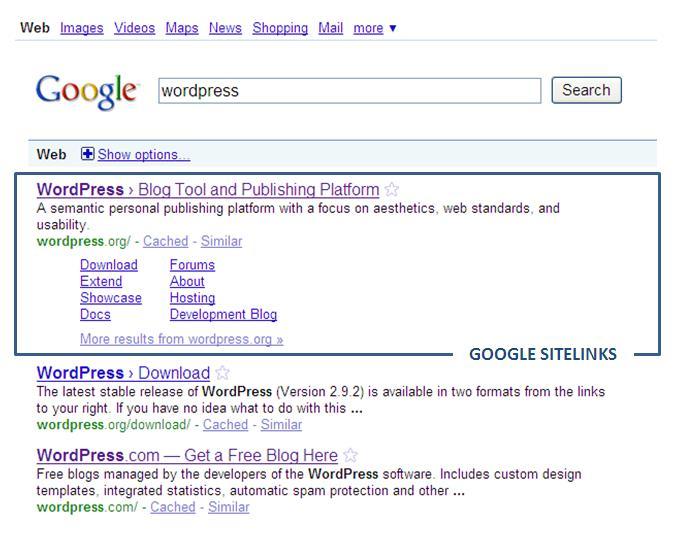
Google Sitelinks Example
3. Don’t put blogs in the corner
Jennifer Laycock won my vote for key takeaway at the Social Media Strategy session. Her winning statement: Blogs should be at the center of your social media strategy. There are a number of reasons why:
- Blogs provide an environment where people don’t feel like they are being sold to (even if they are)
- In social media environments, people are more likely to link through to a blog than link through to a corporate site
- There are too many distractions in other social channels (think related video links on YouTube); and lost people lead to lost conversions
Therefore, your Blog should be the go to destination from other social media tools (EG: Forums, Twitter, Facebook) that you use.
4. Facebook: Be there, or be on the dole
I always scrunched my nose up when it came to marketing on Facebook. Thanks to Marty Weintraub, I am now a convert (and luckily, still have my job).
You’ve probably heard that if Facebook was a country, it would be the third largest country in the world. Well, when you translate that to Internet use, Facebook is half of the Internet. Yes, half. HUGE. Therefore, in Marty’s wise words: “Not being in Facebook paid search is negligent”.
Now some of the B2B-ers out there may be rolling their eyes right now, but Marty is a smart guy. When he says things like “B2B rocks at Facebook and don’t let anyone else tell you otherwise” we should listen to him. In his 12 minute presentation (which just blew the entire audience away), he served up 62 different Facebook segment examples – ranging from tree huggers to bio-medical engineers. And these weren’t piddly lists of people either; these numbers were in the hundreds of thousands, some in the millions.
Experiment and see how many of your customers you are missing out on in Facebook by going to http://www.facebook.com/advertising/
Bottom line: Facebook PPC is like Google SEO. You need to be there.
5. Drag your manager along
Sometimes your manager needs to hear things first hand, from the experts. In the web analytics session, Eric Peterson hit it on the nail for me:
“Data doesn’t analyze itself. You need people. The question is not “Do we need…?”, but “How many…?”
When smart people like Eric and Avinash say that you need to be equipped with a hoard of analytics ninjas, your manager has no excuse not to listen. I also overheard a similar Twitter comment from a social media session going on at the same time:
@ECdavies: Community Manager- It can’t be done in an hour a day.
So if you didn’t already, bring your manager along with you to the next conference so they can hear this first hand… and of course to see people’s reactions when you tell them how many staff you have (or rather, don’t have). Just saying 🙂
Bonus Takeaway
My final takeaway (though it doesn’t take a social media “expert” to figure this one out) is that Twitter is the bomb. It has given me the opportunity to connect with some amazing people in the search and social marketing field, which is so refreshing, especially when you work client-side and have few (or no) like-minded people to geek out with, or bounce ideas off of.
I met some top Twitter friends for the first time at SearchFest, and I can say hand-on-heart that although I use Facebook for the people I know, I use Twitter for the people I wish I knew.
You can catch up with all the action from SearchFest by using the event hashtag #searchfest
A while ago I asked the question, Why should search care about social? One good reason is that social channels are search engines too, and a vast amount of searches are being conducted within social media.
If you’ve attended any major search marketing conference in the past two years, you’ll hear in at least one presentation that YouTube is the second largest search engine after Google. In fact, three of the top 20 search engines (YouTube, MySpace and Facebook) involve search within a social network (Odden, 2010).
This highlights the importance for search marketers to take into account social media searches when doing keyword research. Here are some tips to consider, looking specifically at YouTube, Twitter and Facebook:
YouTube
YouTube serves up hundreds of millions of videos per day so, as with Google, it’s important to ensure that your video content is optimized in order for it to show up well in searches. Lucky for us, YouTube have their own Video Keyword Research Tool.
This is a great way to find the most popular video keyword searches so that you can include these keywords in your title, tags, description and links. I also like it since it uses the same interface as Google’s Keyword Tool.

YouTube Keyword Research Tool
Twitter
Twitter is an excellent listening tool where keyword research is concerned.
Last week, Twitter hit 10 Billion Tweets and counting. So far, search engine efforts to integrate Twitter into Real-Time Search results have been rather “meh”. So many people continue to search for content in Twitter using, for example Twitter Search and Hashtags.
Twitter Lists is also a great way to see how others categorize you or your company. If you take the list names and descriptions that you appear in and paste them into Wordle, you can generate a word cloud. This can show you quite quickly, what keywords people are using to categorize you or your company.
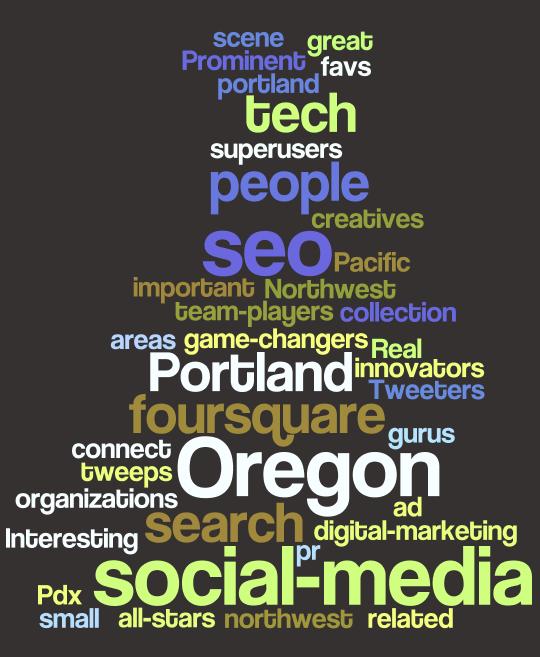
Wordcloud Based on Twitter Lists
Facebook
By using the search box and then clicking “Posts by everyone” in the left nav, you can start to monitor conversations happening based upon keywords you type in. You can also limit results to certain geographies and by post type (all/links/status updates/wall posts/notes) in the drop down lists that appear above the results.
This is a good way of listening to conversations, but can be a little limited when it comes to deeper keyword research and analysis. There’s rumors that Facebook are working on a better tool for page owners, but until then this is as good as it gets.
I finally reached the chapter in Web Analytics 2.0 about social media measurement. In this chapter, Avinash Kaushik highlights some interesting ways to measure the success of blogs. So to celebrate the 6 month anniversary of SEM Booty (I can’t believe it’s been 6 months already!), I wanted go through the process and apply some of Avinash’s success measures to see what I could learn, and find areas for improvement over the next 6 months.

SEM Booty Scorecard
1. Do I deserve to be successful?
According to Avinash, this is the foundation of all blog metrics. To answer this question, you need to look at something called, “Raw Author Contribution” which is:
- Posts per Month = Number of posts / Number of months blogging
- Content Created = Number of words in a post / Number of posts
My Key Takeaways
My frequency of posting (4.6 posts per month) is not bad and my posts are consistently around 600 words which I think is a good balance – not too short, but not huge amounts of detail either. The frequency is definitely in line with my aim of posting at least once a week, on a Monday [My Grade: B].
2. Is anyone reading my content?
It’s great to be able to write down thoughts and experiences, but one of my goals is to share this information with other marketers who may also find this interesting. To help answer this question, we can look at two indicators:
- Number of Followers/RSS Subscribers
- Most Read and Least Read Posts
The number of followers/subscribers to your blog are an indicator of those people who have taken an action to say. “Yes, I am interested and the content is relevant to me”. And by looking at the posts that generated the most (and least) views, you can start to understand what content helps you grow, and what does not.
My Key Takeaways
I have 10 Followers right now. The number has been very slowly increasing over time, but I would definitely like to attract more by focusing on the most popular content areas. Looking at the most read posts to date, it looks like emerging social media subjects, as well as content about the intersection between Social Media and Search Marketing consistently drive the most traffic [My Grade: C].
3. Is my blog generating conversations?
As Avinash points out, blogs are a social medium. So it’s not just about pushing out information, but about encouraging dialogue, conversations, and contribution. One way of looking at this is by using a “Conversation Rate” calculation:
- Conversation Rate = Number of Visitor Comments / Number of Posts
My Key Takeaways
For every post I write, I get 0.62 comments; and for every 597 words I write, my visitors write 20 words. There is definitely room for improvement here. Comments seem so few and far between that every time I do get one, it literally makes my day. Maybe by taking a stronger view on topics will help to encourage more feedback (EG: Twitter is not a strategy post) [My Grade: D].
4. Are people talking about my content?
According to Avinash, this measure of success is about looking at the ripples caused by your blogging efforts, and asking “how viral is my content?”. One way to look at this is through Tweet Citations (how many people tweet about your post):
- Tweet Citations = Number of Tweets / Number of Posts
My Key Takeaways
From what I was able to track, there’s been a total of 60 tweets related to my posts, which means that for every post, I generate an average of 2 tweets. Again, there is room for improvement here. Focusing down on the popular topics may help. Testing of different titles, and experimenting with the way that they are written, may also have an impact [My Grade: C-].
Summary
This was a useful exercise to go through and I would recommend anyone with a blog to go through the same process; it’s quite an eye-opener. Overall, I gave myself a C, so there’s plenty of room for improvement and best of all, I know where to focus that improvement. Finally, if you haven’t already, pick up a copy of Avinash’s book. It’s been a great read for me so far.
I’ve been a Foursquare user for about three months now. At first the idea of people knowing where I was (or not), was a bit unnerving. I guess the “dangers” of social location have been brought even more to light with the recent coverage about pleaserobme.com
Recently though, I’ve been thinking more about the business applications of Foursquare, not just for local businesses but also for larger/enterprise ones. First up though, here’s a bit of background (most of you may already be familiar, but just in case):
What is Foursquare?
Foursquare is a location-based social networking application that is growing fast; US visits to Foursquare have rocketed by 50% in January compared to December alone (Experian Hitwise, 2010).
So what’s it all about? You use the Foursquare app on your mobile phone to “Check-in” to different places – be it the gym, your work, your local grocers, an airport… basically anywhere. If Twitter answers the question “What are you doing?” then Foursquare answers “Where are you (doing it)?”.
This information can also be linked to your Twitter and Facebook accounts to let the people in these networks know where you are. Or you can choose to limit this information just to your Foursquare network, should you not want to share this with your wider network.
To encourage use, there is also a gaming element to Foursquare. As you check-in to more/different places you earn “Badges”. For example, on your first check-in you unlock a “Newbie” badge; and you unlock the “local” badge when you check-in to the same place three times in a week. Right now there are 32 badges that are available to unlock.
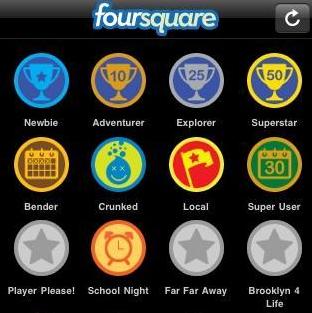
Example of Foursquare Badges
Last, but not least, if you happen to be the person that has the most check-in’s to a particular location, then you earn the title of “Mayor” of that place. Of course you can be ousted as Mayor at any time, should someone else check in more times than you do. When this happens, you receive an Email to notify you of your ousting, and by whom. If you have Foursquare linked up to your Twitter account, then it will also send this out as a tweet.
When I explained Foursquare to someone recently, it sounded really dumb, but it’s surprising how addictive and competitive it can get, especially as more people start to join up.
So What are the Business Applications of Foursquare?
Local Businesses and Stores
One of the main aims of Foursquare is to encourage people to explore their neighbourhoods. So it is quite easy to see how Foursquare can be used by local businesses, including:
Rewarding Mayorships
Do you remember in the 90’s when loyalty cards first started to take off? Well, mayorships could be the new loyalty card in the making. There are many examples of businesses who are starting to use Foursquare to reward such loyalty, including Mio Gelato in Portland, where the mayor gets a free coffee and gelato scoop; and Dominos Pizza Huyton in Liverpool where the mayor gets free pizza. Nom nom.

Rewarding Mayorships: Domino's Pizza
Rewarding Check-ins
Local businesses can encourage people to keep coming back by also rewarding them for their check-ins. For example, a reward may be given for a first check-in to an establishment, or for multiple, returning check-ins (such as five check-in’s in one month). It’s a good way to encourage people to keep coming back, especially when the prospect of becoming the mayor of a popular place is a difficult title to achieve.
Using Location Information to Flag Special Offers
If a person checks-in to a place nearby your business, then Foursquare can flag “Nearby Special Offer” for your establishment. This is a great way to raise awareness of your presence, especially if you are a newer business that has just set up. It also helps to encourage people to come visit your store. As an example Boyds Coffee in Portland flags a special 15% discount when you check-in nearby with Foursquare.

Boyds Coffee Special Offer
Encouraging People to Write Tips
Another nice thing about Foursquare is that people can leave tips (which serve as recommendations) for different places they have visited. People in their network will be able to see these tips and can add them to their “To-Do” list. Encouraging people to leave tips on their experiences can be a good way of gathering positive reviews, particularly when users have a good number of local connections.
Enterprise Companies
When it comes to enterprise or B2B companies, the application of Foursquare becomes a little less obvious. Most of the ones I am aware of revolve around things like events, exhibitions and conferences. In fact, Foursquare has the potential to work very nicely where event marketing is concerned.
Rewarding Check-ins
Check-ins could be used to help encourage booth traffic. Use the geo-location feature to add your booth location as a place on Foursquare and then encourage people to check-in, for example, to get entered into a free drawing.
Special Offers
Another idea would be to offer a free giveaway to the first 20 check-ins at your booth. If people check-in to the conference center, or building in which the event is being hosted, then you can use the “Nearby Special Offer” feature to flag the special for your booth.
Develop Special Badges
Some companies have made good use of the gaming component of Foursquare to encourage people to check-in. For example, the CES Consumer Technology Trade Show developed their own special CES 2010 badge when visitors checked in to the Las Vegas Convention Center. Intel also designed their own badge for CES visitors who came to see them.
Large events like this are also good opportunities for people to unlock the Swarm badge (where 50+ people have checked in to the same venue).

Special Badges: CES 2010 and Intel at CES
Please feel free to share any other ideas or business applications you have seen for Foursquare.
Search is not a silo. This was the core message at a Search Marketing Conference I attended last week, and provided plenty of food for thought.
Search engine marketing is a relatively new practice when comparing it to the more traditional marketing tools, like advertising and PR. Yet, it is still just one component within the overall promotional mix. So as search marketers it is important for us to take a holistic approach and integrate it within the entire marketing toolset.
“Search is the lead singer in a rock band. The other marketing channels are the instruments that support search” (Russ Mann, Covario, CEO)
This makes entire sense, and is necessary in order to take the benefits and efficiencies of search to the next level. However, this is not without challenges. Organizationally, it requires us to educate and work closely with our marketing counterparts to ensure the integration of search within marketing programs. Secondly, in order to show the real benefit of integrating search with other media, better attribution models are needed.
Right now, search holds a privileged position when it comes to attribution. Attribution is where credit is given (attributed) to the last action (often click) that the customer makes. Since search is often geared towards the end of the funnel, it tends to take the credit (more often than not); some may argue, over-credited at times. This is just the reality of how a lot of analytics systems are set up within companies.
The reality, of course, is that conversion does not just happen at one particular point in time, or generated by just one particular medium. Rather it is a journey where many different media can work together, and contribute, towards that last click prior to conversion. Therefore, better attribution models are needed in order to assign credit in multi-channel programs.
This is not an easy task due to the vast amount to data it can yield, not to mention the lack of technical expertise and in-house resources, to name a few. It is, however, an important piece of the puzzle we need to solve in order for us to:
– Fully garner the benefits of search across multiple channels
– Better understand the touch points leading to a conversion
– Make better marketing decisions moving forward
Thanks to @covario and all the presenters at the InflectionPoint ’10 Conference last week (Twitter event hashtag: #ip10).
 SEM Booty Blog