I don’t know about you, but keeping up with the whole Google-China situation has, at times, been as difficult as predicting the World Cup this year. People keep asking me what’s going on; I keep on asking what this means for China search marketing efforts.
I’m a picture person, so I drew up a timeline and summary of main events to date, to try and make sense of it all (sorry about the small text. You can click on the image to read it in full).
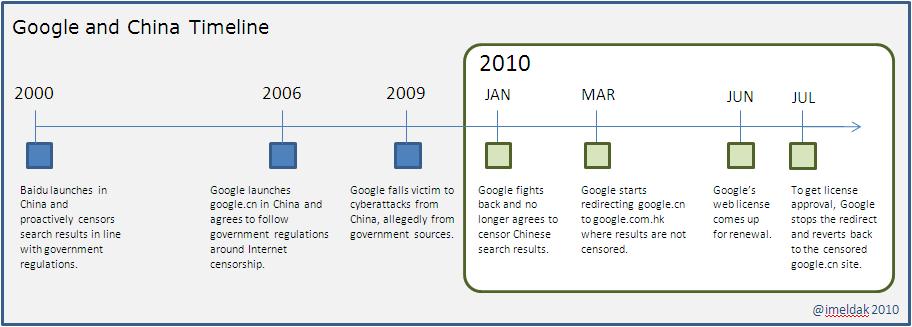
Summary of Events
- Since setting up in 2006, Google China search results have been censored to comply with government regulations (China is a bit strict that way. Many social networking sites in China, including Facebook and Twitter, are blocked).
- In the meantime, Google received criticism for “selling out” to censorship, since it doesn’t play well with their “Don’t be evil” mantra.
- In January this year, Google announced it had become victim of cyber attacks from China. Allegedly it was from shady government sources who were trying to uncover information about human rights activists.
- Google decided that it would no longer succumb to the government rules, so they put on their poker face and threatened to pack up their bags and move out of China altogether.
- The “will they, won’t they” speculation kicked off and Baidu started rubbing their hands together (muwhaha!).
- Talks between Google and the Chinese Government shortly commenced.
- In March, Google found a loophole in the system and started automatically redirecting users of Google China to Google Hong Kong, where results aren’t censored.
- Needless to say, the Chinese Government were pissed with this move.
- But the advantage would soon turn again in the government’s favor when Google’s web license (the one that allows them to operate in China) came up for renewal at the end of June.
- The license would only be renewed if Google stopped redirecting users to Google Hong Kong.
- So Google stopped the redirects for fear of going dark and reverted back to a censored Google China. The Google Suggest feature was also blocked.
So what does all this mean?
When the Google Hong Kong redirects happened back in March, I wrote about what the Google-China situation meant for search marketers.
With the benefit of a few months hindsight, nothing crashed and burned when the Google redirect happened. I did see Baidu Cost Per Clicks (CPCs) increase slightly (4-5 cents at most), but then again what’s a 5 cent increase when Baidu’s CPCs are still running at half the cost of Google?
Now that things are back to where they were, will it be business as usual? Well, if the past is anything to go by, the shaky relationship between both sides is likely to continue. Whether this uncertainty results in more advertisers shifting significant PPC investment towards Baidu is likely, but yet to be seen. What’s important, is to keep a close eye on spend and performance in these engines, and let the numbers guide your decisions.
What happens next is anyone’s guess; just don’t ask me. Afterall, I predicted Italy to win the World Cup 😉
SEO has become a much bigger priority for me this year, how about you? For me, the numbers speak for themselves – Over the past six months, I’ve seen SEO consistently deliver 20% more search engine traffic than PPC; and when it comes to key conversions, SEO dominates PPC 80/20. That’s pretty huge.
There are hundreds of factors that go into determining search engine rank. Although I couldn’t name all of these off the top of my head, I do know that Meta Description is not one of them. So the question is, if Meta Descriptions don’t help you rank higher in search engine results, why waste time on them?
Meta Descriptions may not be the first priority on the SEO fix list, but they remain a key ingredient to drive search engine traffic through to your page, and should not be disregarded by any means. Along with the Title Tag, it is what searchers see first when you appear in the Search Engine Results Page (SERP), and has the potential to either help or hinder a searcher’s decision to move forward (ie. click-through to your page).
As part of the SEO effort I’ve been reviewing, writing, re-writing, editing and re-editing a bunch of Meta Descriptions, starting with our most important keywords. I wanted to share with you some of the lessons (and reminders) I’ve been learning (and re-learning) along the way because – let’s face it – great meta descriptions are really tough to write.
1. Be Succinct
The general consensus (though I have seen variations) is that:
- Google displays up to 160 characters
- Yahoo! displays up to 165 characters
- Bing displays up to 185 characters
It’s always a good idea to aim for the smallest (160 characters) to ensure that your Meta Description displays fully in all search engines. Personally, I aim to write for 150 characters, and only spill over to 160 if it’s absolutely necessary. If you’re not used to writing within small limits or if, like me, you’re a hopeless warbler, then go practice writing on Twitter for a while (great tip I picked up from @beebow). You’ll be thanking Meta Descriptions for those extra 20 characters in no time!
2. Utilize the Keyword
It’s widely recommended to include your brand and the keyword in your Title Tag. Similarly, you should always include the keyword in the Meta Description (as close to the front as possible). This helps provide a good scent for the searcher (from search query, through to search result, and eventually through to landing page). It’s also a good way to catch searchers’ eyes when scanning the results page.
3. Make it Interesting
This is probably the most difficult part, especially if your products aren’t as exciting as Apple or if your company is ultra conservative and not at all quirky, like Woot! Keeping it brief is a given, so the trick is to go for as interesting and informative as you can. Try and empathise with your searcher to get their attention. For example, asking them a common question that highlights a problem they may be experiencing (to which, of course, you can provide the answer to).
One approach you could take is to see what tone of copy worked well in PPC and adapt it to SEO. But don’t always assume that what works well in paid will also work well in organic, as the motivations of searchers who click on paid results are sometimes very different to those who click in the organic space. On the other hand, this really boils down to the level of search sophistication your customers have. Believe it or not (and it can be hard to if you consume yourself 24/7 in search marketing), some people still don’t know the difference between paid and organic results in the SERP. I guess the lesson here is to know your audience; and if in doubt, test, monitor and refine.
4. Remember the Call to Action
When you have written your Meta Description, read it out loud and ask yourself, “Would this encourage me to take action?”. If the answer is “No”, or “Not sure”, then have another go. There needs to be something in the copy to prompt a searcher to take action. This could be a physical call to action (get a free something) or something as simple as using terms like “Learn more” or “See how”.
Where appropriate, you may also consider using time-sensitive words to prompt searchers to take action – for example, words like “now” or “today”. Sometimes this can come across a bit spammy though, so this tactic may work better for things like time-limited promotions or event registrations (which are arguably better suited to PPC).
5. Read it, re-read it, and re-read it again
Just like anything you write, make sure you keep reading it, take a break and read it again, and continually ask yourself:
- Would this catch my attention?
- Would this make me want to take action?
- Can I do better?
What tips do you have for writing good Meta Descriptions?
I’ve been suffering from a bout of a blogger’s block recently. I try to show some SEM Booty love every Monday, but last Monday there was a big fat nothing of a post sitting there staring disappointedly at me. It’s not that I’m short of topics to write about – I have a bunch of half written drafts sitting in my queue, but the challenge is how to make them that little bit more interesting, and how not to be repetitive of topics others have covered to death.
So with Monday already fast approaching again, I decided to sit down and try to figure out how to pull myself out from this rut and come up with a string of solid topics. Here’s what I came up with.
1. Listen to the word on the street
One good way to get ideas for blog posts is to figure out what topics are rattling people’s cages “right now”. Monitoring what conversations are taking place on Twitter has helped inspire a number of blog posts for me. For example, the recent outcry over Facebook privacy led me to write about Facebook Community Pages, whilst news of Google’s three column results page was an easy lead in about what Google’s new design means for search marketers – both of which turned out to be pretty popular posts as far as my stats go. However, big or interesting news topics like this don’t happen all the time, so what else can you do?
2. Learn from your popular posts of the past
Sometimes if you look back at past posts and look at which posts have been the most read, or the most commented, or the most shared… a pattern will often start to emerge in terms of popular topic areas. For me, posts on the intersection between search and social, tips on searcher intent, as well as other ways to integrate search marketing always seem to do pretty well. This will at least give you a starting point in terms of a topic area to focus on.
3. Use real-life lessons
I spend way too much time at work. Even when I’m not at work I spend too much time thinking about work. A good way to come up with a string of posts is to consider what projects you are working on, and what issues and lessons you’ve had to deal with and overcome. If you had to do it again, how would you have done it differently? What lessons or advice can you share that others can also relate to? Most of us spend over half of our life at work so there should be plenty of blog potential screaming to get out… unless, of course, you sit around in your cube playing Farmville all day.
4. Provide a different perspective on posts that have already been written
As a relatively new blogger I like to spend time reading and learning from other bloggers. There’s a ton of great information out there and writers to be inspired by. Amongst my favourite bloggers right now are Lisa Barone, Danny Sullivan, Rand Fishkin, Mike Moran, Drayton Bird, Keith Hann, Jenny Lawson… the list goes on.
If you’re struggling to come up with topics then take a look at all the good content that’s already been created. Maybe you’ve read a post and can provide a different opinion on the matter (never steal though, especially without acknowledging the writer… stealing is bad. You know who you are!). There’s also a good opportunity to go back to your own past posts and provide updates or changes in perspective since the event, or go even deeper into a particular area that you only touched upon in a previous post.
5. Ask people what they want to know
If all else fails, then just ask. Ask the readers of your blog, your colleagues, friends, contacts on your social networks… Blogger’s block can happen to the best of us at one time or another. I’ve seen some of the best writers sending out a wee cry of help on Twitter on more than one occasion.
And finally, what do you know. The best part of going through this process? I’m off the hook for another week 😉
You’ve spent several months building up your online store and met with departments in your company that you never even knew existed. You’ve tested it, made it look pretty and worked out all of the back-end processes and details. The day has finally come when you can press that “go live” button. It feels great. Then you wait… and wait… and wait.
I’ve never been lucky enough to experience the whole “build it and they will come” phenomenon, or if this even exists. So in the hullabaloo of getting your store up and running it’s important not to forget about how you are going to get customers there in the first place. Which is why building a solid promotional plan should be a central part of your e-commerce strategy in order to:
- Raise awareness of your online store
- Drive people and their wallets to the store
- Encourage sales through an excellent store experience
In this post, I’ll focus specifically on the drive traffic part, and will highlight five of the ways you can drive traffic to your online store.
1. Link to your store from your website
Obvious, but important not to overlook. It’s likely you are already getting a good number of visitors to your site, so make it easy for them to get to your store. Work it into the main navigation if it isn’t already, and use prominent “Buy Now” buttons on key pages, including the home page. Also don’t forget to incorporate links on those pages that are more geared towards customers who are interested in buying, such as product detail pages.
If you are really good, then do some usability testing on your site with your customers, and find out whether they able to get to the store from all the places they would expect.
2. Optimize your store for SEO
Google handles hundreds of millions of searches per day and counting. For me, more than half of the traffic I see coming through to my website comes from search. So you need to make sure you are ranking well in the Search Engine Results Page (SERP) when people are looking to buy.
Do some keyword research to see which related phrase(s) are searched on the most. For example, it could be:
- [Your company name] web store
- [Your company name] online store
- Buy [product name] online
- Get [product category]
- Or something else
If you are still unsure which the best phrase will be, then test out some keywords in PPC first and understand not only what drives volume, but what drives conversion.
Also don’t forget to set up a Google Merchant Account so that your products show up in Google shopping results.
3. Develop a PPC online store campaign
PPC is a great way to help drive “buy” related searches through to your online store.
Unlike SEO where you optimize for one keyphrase, PPC allows you to focus on several words and phrases that searchers with buying intent may use. For example, model numbers and trigger words such as “buy”, “purchase”, “price”, “discount” “deal” etc. The volume on these words may be smaller than usual, but are likely to convert better on the back end, since these people are most likely looking to enter into a transaction.
4. Spread the word through your social channels
If you are already active in social channels and have a good following, you can use this as an opportunity to spread the word about your online store. But a word of warning – If you are just starting out on social media, try to establish yourself first and build up your relationships before peddling your wares.
You may also consider offering up introductory promotional codes to use in your online store, and just make these available through Twitter, Facebook, or whichever social channel that works well for you. Dell put this to good use in their Dell Outlets Twitter account.
5. Email
E-what? Just kidding. Email is still worth its weight in gold (when done right) when it comes to demand generation. So don’t forget to Email your customer lists, targeting those people close to buying in the funnel, or existing customers whose warranty is coming to an end and may be looking for replacement products.
Last but not least, remember to set up good site analytics in your online store so that you have full visibility as to where traffic is coming from, key conversion events (and abandonments), and conversion to sales $ linked to traffic sources.
We’ve all been there… When all the signs are pointing to something that *must* be done to make business better, or something that is so blaringly wrong that needs to get fixed. But somehow the message isn’t being heard, or it gets stuck somewhere up the chain of command, and no matter how hard you try you can’t seem to get the support you need to make things right.
Maybe you need to start selling your products online but you can’t get the time of day when it comes to getting it on people’s roadmaps. Or maybe you work in a remote office and your colleagues sitting in their comfy headquarters 5,000 miles away won’t admit there’s a problem just because your search results aren’t localized, or worse still you’re not even appearing in the local engines.
When you find yourself in this situation (and hopefully it isn’t too often), the answer is always shame.
Here’s 3 ways you can use shame to get things done:
1. Shame them with examples of companies who are succeeding where you are not
If you find yourself faced with the poor excuse that “We can’t do that because it just won’t work for us” then find examples from similar industries where it has worked.
As an example, maybe you are trying to get your company to start selling products online and are told that E-commerce won’t work for expensive B2B products. Try and find out the proportion of business other similar companies conduct online vs. offline. I’m sure big technology companies like IBM wouldn’t have an online store if it didn’t reap the rewards from it. Do your research and work your network to get the information you need.
2. Shame them by comparing your performance against your competitors
If there’s one thing I know about sales and marketing people is that we are damn competitive. There are examples everywhere of companies taking cheap jabs at their competitors just to make internal folks feel better about themselves – be it through some side-by-side video that demonstrates competitor shortcomings (no matter how obscure they may be), or by sponsoring competitor keywords in PPC.
Of course we should know better and focus efforts on our customers not competitors. Unfortunately it doesn’t always turn out that way as the thought of your competitors doing better than you has a way of making people’s blood boil.
Take search for example. If you are a global company then you need to be optimized on a global scale, which also means having a presence locally. If you’re not getting the support you think you deserve on a local level, then document your rank for important keywords vs. your competitors in the local engines and/or in local language. Then start to estimate your lost impressions (awareness), traffic (clicks), conversions (leads, sales) as a result of not being there. This leads nicely into the final shame…
3. Shame them with data and missed profit opportunity
“An ounce of data is worth a pound of opinion” (via @avinashkaushik). Always back up your point with data – people will always express an opinion, but no-one can argue with numbers and facts.
Probably the most effective way to shame people is by using data to show exactly what you are losing out on as a result of not doing something. Gap analysis is just one good way of simply presenting shortcomings. Tying things back to the bottom line is always the ideal, but in instances where this may not be possible, then use data around lead counts or other conversion events that contribute towards a sale.
I’m not sure about you, but I could always do with more money for PPC. It’s not that I’m greedy and like to spend money just for the sake of it. Sometimes there’s only so much consolidation, tweaking and efficiency you can achieve within a given limit.
I’ve found that one good way to try and secure additional funding (and generally, it’s a good health check to do anyway) is to spend time looking at gaps; in particular gaps in spending and gaps in performance as a result. In essence, it’s a way to let people who hold the purse strings know what they are missing out on as a result of not spending x amount.
With Gap Analysis you identify your total spend opportunity and total performance opportunity and plot this against your current spend and current performance. By doing this you can start to easily compare the gaps between the two – current and ideal. Depending on how deep your analysis goes this can involve quite a bit of data, so the key is to try and present it as simply (ie: visual) as possible.
In order to be useful on a number of levels, I see an effective Gap Analysis as having two main parts:
1. High Level Gap Analysis
The big guys like to see the big picture; they don’t like to get too bogged down with the detail, so this part of the analysis is for them. In essence it’s the executive summary that shows them in one glance how much we are spending and what we are getting, compared to how much we could spend and how much we could get as a result.
Use a set period (be it a year, half year, quarter etc.) and record your current spend, spend gap, and total potential spend; then on a second axis do the same for a chosen performance indicator – for example, it could be number of clicks, number of key website engagements, number of leads, sales order dollars etc. The closer you get towards calculating actual $ as a result of performance, the more attention you are likely to get.
Then plot this data out in a chart. I’ve found that using stacked columns (for spend) plotted against stacked lines (for performance) helps to illustrates the gaps well. Here’s an example below. Although the numbers I’ve used here are made up, it illustrates quite clearly the gaps in spend vs. performance, as well as the consequences of a budget reduction.

Gap Analysis – High Level Example
2. Segment Gap Analysis
Once you have your high level gap analysis you can start slicing and dicing data at a deeper level (for example by region, country, product group, customer segments etc) to help inform you where the best opportunities lie.
I’ve found it’s most useful to slice the data according to how your company is organized as it helps to target the data to potential sponsors. So for example, if internal funding opportunities come from a product line group, then slice the gap analysis by product line.
Even if there isn’t any immediate funding available, it’s good information to have to hand when budget does happen to appear, and even if you don’t get the whole “ideal” amount (the chances of which are slim at best), it provides a good talking point to negotiating a contribution towards minimizing the gaps.
If you were on Twitter last week, you may have noticed one particular topic causing a few waves – Facebook. To be exact, Facebook Privacy… or rather lack of. In case you missed it, here’s a very small taster of what people were saying:
- @DraytonBird: To fully protect your privacy on Facebook, you must click over 50 privacy buttons, then choose among over 170 options. Hmmm.
- @Marshallk: More Web Industry Leaders Quit Facebook, Call For Open Alternative http://bit.ly/c4iKYx
- @rustybrick: Facebook’s Zuckerberg calls his users “dumb” for “trusting” him http://bit.ly/9bMX7t
- @beebow: times, they are a-changin’, eh @MerryMorud? http://bit.ly/9Wl9uc via @lookadoo #facebookisscary
- @markgr: Colleges ‘Freaking Out’ Over New Facebook Community Pages http://bit.ly/aWuy4v
- @adamvonwillis: RT @anildash: I’m really enjoying seeing the public dialogue reimagine Facebook as the world’s most elaborate phishing scam #phishbook
It paints a very different story from not too long ago, when Facebook was the Social Media darling. When I first started using Facebook I always thought it was everything Friends Reunited should have been (Friends who…?!), but has the tide started to turn against them?
Two things in particular got me fired up about Facebook this week – both of which revolved around Facebook’s new “Community Pages”.
1. Poof! It’s Gone
It all started on Sunday evening when Facebook popped up a message on my screen wanting to link my Education, Work, and Interests (EG: favourite books, films, music etc.) on my profile to publicly open Facebook Community Pages. The first time this message appeared I pressed the skip button, but this time it didn’t provide me with that option, so I declined.
Then all of a sudden, Poof! It’s gone – all my personal information I so lovingly invested the time in creating when I first set up my Facebook account (you know, back in the days when Facebook didn’t try to force you to share things with the world) disappeared. Evil.
2. Owned
During the above the process, I stumbled upon my company’s Community Page on Facebook. That is when I started delving more into what Community Pages were. In summary, it’s a facade of a corporate page on Facebook, made by Facebook; it collates a news feed of mentions for that company.
If you do a search on a company name, the Community Page appears as “Organization” – interesting they chose this description, rather than “Community Page”, since it gives the impression that it’s a page owned (and controlled) by the organization, which of course it is not.
Granted, it can be quite a useful monitoring tool for companies, though I’m sure this isn’t the intention. However, many companies already have their own company Facebook page and some feel that Facebook should at least ask them for feedback on the information they are showing.
In terms of feedback, the Community Page does display this message…

When you click the link, this is what you get…

So basically, Facebook gives you the middle finger – they’ll ask you for suggestions about your page when they are ready. I then proceeded to click on the link for a number of competitors… after all I have a passion for them too, even if it is a slightly different kind! But joking aside, what’s to stop someone from Microsoft, for example, wanting to “improve” Apple’s Community Page?
From a personal perspective, I know that Facebook has been wanting their piece of the public sharing pie for a while. However, there is a fundamental difference between their service and that of others, in particular Twitter. When we signed up for Twitter we accepted that our tweets would be public. But that’s not the deal most of us made with Facebook.
From a business perspective, all I can say is monitor these Community Pages closely and make sure your Wikipedia entry is up to date because this is their main reference point in terms of content about your company. Time to plant a few more inbound links maybe 😉
That’s my rant over… Back to normal next week!
Other search engines have been doing it for a while, but last week saw the roll-out of Google’s three-column results page, where search options (previously hidden behind an expand button) is now a permanent fixture in the left-hand side of the Search Engine Results Page (SERP).
What does this mean for search marketers? Well, if you’re not already, it’s time to give some love to your Universal Search efforts. Now that searchers can more easily refine their queries we need to start expanding and optimizing content beyond traditional page SEO and PPC methods.
Here’s a brief look at 5 of the most prominent universal search options:
Shopping – If you sell online, you want to be showing up in Google’s shopping results. Make sure you have a Google Merchant Account (which can be linked to your paid search account) and start uploading and managing your product listings. Try to target searcher intent through buy-related and long-tail keywords for those searchers who are further down the buy-cycle.
News – Make sure your Press Releases are properly optimized for organic search. Speak with your PR Manager and share your SEO keyword list with them so they know to match anchor text to your keywords and provide back links to your preferred landing pages. Optimizing press releases are also important from a social media perspective, since Bloggers (and Tweeters) will often refer to news wires and search engine news services as a source of information.
Blogs – Google have been experimenting with social search for a while, but it’s interesting to see them bring Blogs to the forefront. If you have a company blog, it’s a great place to utilize important keywords and provide linking opportunities within your website. If you’re not active in the blogging space, decide whether it makes sense to either start one up, or even guest post on an existing industry or publication blog. Also make sure you are monitoring blog posts mentioning your company name and keywords (for example, through listening tools like Google Alerts and Twitter Search).
Images – I don’t know about you, but the one thing I’ve noticed when going through SEO reviews are that Alt Tags are regularly overlooked when building and optimizing pages. Make sure those Alt Tag fields are populated with appropriate SEO keywords, particularly for images that appear on your preferred landing pages.
Videos – Optimize your videos for search by using keyword-rich titles, descriptions, and meta. Also offer up a textual transcript of audio and video content where possible. Think about where you will host your video – on your own website is fine but it’s also good to submit it to various video sharing sites (for example, YouTube) to help increase exposure. Also remember to provide easy options for people to share the video with others. There’s a bunch of ways to optimize video for search engines, much more than what I’ve touched on here.
It’s not uncommon to find that searches on your company name bring in:
1. The most referrals to your site
2. The most quality traffic to (or conversions on) your site
3. In many cases, all of the above
When a search like this is done, we know the searcher already has you in their mindset and hopefully you will be appearing top of the Search Engine Results Page (SERP) – in SEO, PPC, or both. But what exactly are these people looking to find? What exactly is it they want from you? What is their intent?
This is where Google Sitelinks can really help. I first came across Sitelinks at SearchFest and got the ball rolling from there. Since then I’ve learned more about them, and finally put them into action with positive results. If you haven’t put Sitelinks in place for your site yet, now is a great time to start.
What is Sitelinks?
Sitelinks allows you to display additional links as part of your search engine result to help direct people deeper into your website. There are Sitelinks for SEO and Sitelinks for PPC. As always, PPC Sitelinks are more easy to control and provides the best starting point. With PPC Sitelinks you can choose four additional links to display in your ad.
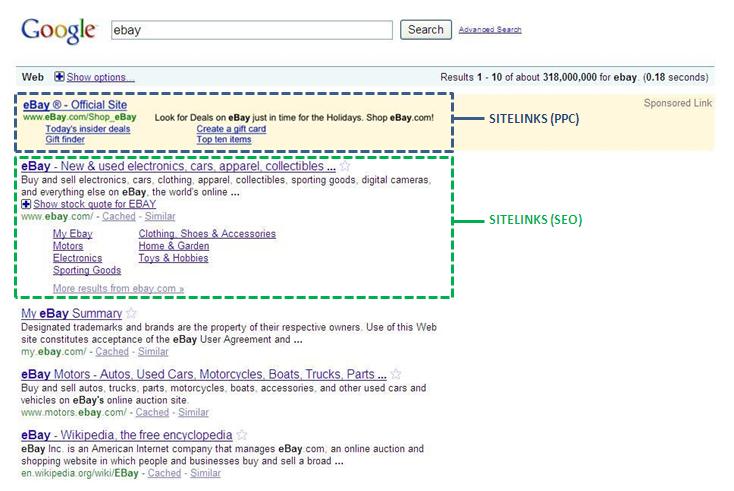
Why is Sitelinks Good?
Sitelinks are good for companies and searchers.
For searchers, the relevance of the ad is improved as there are more options to navigate to the right area of a site, on first click.
For companies, improved relevance means increases in click-thru rate (Google estimates an average CTR increase of 30%). And because you have more links in the ad, it also means you have almost twice the real estate on the SERP, pushing other entries further down the page… We like that.
Sitelinks are also great to improve targeting and can help you drive specific Key Performance Indicators (KPIs):
1. Target Intent
PPC Sitelinks provides a fab way to better target searcher intent. Rather than provide searchers with a one click option to your homepage, you can start to better understand their intent by focusing site link options around the different stages of the buy-cycle.
As an example, your four buy-cycle-related Sitelinks may include:

2. Drive KPIs
Being able to link Search to your organization’s Key Performance Indicators (KPIs) is golden. If your goal is to drive more key actions or specific events, then you can target your PPC Sitelinks to focus on such KPIs.
As an example, your KPI-related Sitelinks may include:

You can even drive visits to special promotions (for example, an event/live webinar sign-up, or a limited-time product promotion), which can be quite easily put in place and swapped out as needed.
How do I get Sitelinks?
In order to qualify for Sitelinks, Google has to be entirely confident that your PPC ad is the right answer to a search query. Even if you appear in the top spot for a keyword like “printer”, you’re not necessarily the right answer since there’s a ton of printer manufacturers out there.
So by default, Sitelinks tend to be limited to your company name and specific brand-related terms (for example “yourcompanyname.com”). In addition, you have to:
- Be the first position PPC ad
- Have a substantially higher CTR than any other ad in the SERP
- Have Sitelink URLs that are a part of your main website
In Adwords, you can specify up to 10 Sitelinks in priority order. Although Google will only display four, they will rotate links in place of lower performing ones, so that over time the best performing Sitelinks are the ones that appear most often.

Bottom line: Sitelinks are not only your friend; they’re your BFF.
In case you haven’t heard, there was a wave of Facebook announcements made last week: Social Plugins, Open Graph Protocol, and Graph API.
The most anticipated of these announcements involved one social plugin in particular – the “Like” Button. Basically you can add a Facebook Like Button to any of your webpages. When a person clicks that Like Button, it links through to their Facebook account and appears in their profile feed for friends to see. According to SearchEngine Land, adding that button effectively turns it into a Facebook fan page.
First Google Sidewiki, now Facebook Like – Charlene Li‘s prediction of the social web expanding outside the confines of social sites and into our own websites, is starting to become a reality.
So without further ado, here’s 3 reasons why we should like the Like Button.
1. Reach
Like a broken record, you may have heard these a few times before:
- If Facebook was a country it would be the third largest country in the world
- Facebook is half of the Internet
Whether you are pro-Facebook or not, you can’t ignore the huge amount of reach it has, and the huge amount of people (ie. customers) who are on there. Think of all the people who can see that their friends – potentially your customers – like you, or your product, or your content; and as a result will go check it out for themselves.
2. Simplicity
Let’s face it, people are lazy. Why write a blog when you can tweet 140 characters? Why spend time writing a comment when you can just press a Like Button. I’m guilty, you’re guilty, we’ve all done it at some point or another.
People are just too busy with too many other things, but at the same time we still want to feel connected to the world. The Like Button (aka the Lazy Button) is simple, and allows us to stay connected with one click. Facebook CEO, Mark Zuckerberg predicted that 1 billion Like Buttons will be clicked on within 24 hours after its launch (eMarketer, 2010).
Furthermore Facebook has made it simple for web developers to easily apply social functions to your site. The small amount of code to add Like functionality has already been provided… So there’s no excuse.
3. It’s All Positive
Believe it or not, some companies are still scared of adding feedback mechanisms like ratings and reviews to their site. God forbid, what if someone says something bad? Of course we know this is a very insular view – if people have something bad to say they will say it, be it on your site or elsewhere. The web is a very big place afterall, so better for it to happen somewhere you can see it so that you can address the issue quickly and properly. However, many companies are still held back by this fear.
The Like Button, in all its simplicity, helps to encourage such companies to start dipping their toes in the social swimming pool. There’s one option: “Like”. No “Dislike” [yet]. No “It’s alright, could be better”. Just “Like”.
There’s nothing to be scared about here. Who knows – maybe some companies will start to discover that more people than expected actually like the things that they are doing. Maybe the experience will even encourage them to more readily open up into a conversation with customers.
Like it or hate it, what do you think about Facebook Like Buttons?
 SEM Booty Blog